
 |
WorkedFields
is a Windows
application that displays a map showing the
amateur radio field squares
contacted and logged in using a third-party
logging program.
WorkedFields uses colors to display
information on a per-band basis. Up
to four bands can be displayed concurrently.
This project was initiated following a request from a WorkedGrids user who thought a field square mapping software similar to WorkedGrids would be useful. Examination of the programming code convinced me that it would be possible to create a field mapping software based on WorkedGrids with relatively few changes. The software is directed towards the HF operators who collect field squares for contesting or award purpose. For that purpose, WorkedFields also calculates the number of field square worked for each band. It is designed to supplement a logging program and it replaces the pen and paper drawing technique. 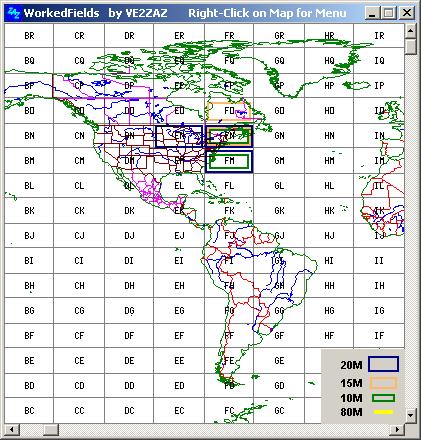 For
its input, the program
reads the plain-text (ASCII) log files
generated by most logging
programs. The file is read at a set interval
and the worked field
squares on the map are updated in a dynamic
way as the contest
progresses and the log file is periodically
saved.
A
world map is implemented
so any area of the world or the entire world
can be displayed. A
zoom-in feature provides
a closer look at
at a specific area. Support
for printing and copying to
clipboard is also provided. Note:
The picture to the right shows an example of
a 420 x 440 pixels
window with just a few QSO's.
Examination of the log file with a plain text editor may be necessary depending on the log file format selected. This allows to identify the type of log file format used by your logging software. WorkedFields supports 4 types of plain text log book file:
20M
VE2ZAZ FN36 .....
160
VE0MAT
FO44bk .....
14
W3CA
EN32 .....
20M,59,VE2ZAZ,FN36,
.....
160,599,VE0MAT,FO44bk,
.....
14,559,W3CAZ,EN32, .....
<QSO_DATE:8>20080119
<TIME_ON:4>1906
<CALL:6>VE3CVG <BAND:3>20M
<MODE:3>USB
<RST_SENT:1>0 <GRIDSQUARE:4>fn25
<EOR>
All
settings (text file,
path, type of log file, colors, fields, window
map window position,
etc) are saved to the hard drive directory
upon program exit.
These settings are restored at program launch.
This program uses a non-invasive installation; it does not install DLLs. All files are installed within the same directory.
Operating System: Any 32-bit or 64-bit version of Windows from Windows 95 to Windows 11. Minimum CPU Hardware: Pentium-Class CPU, preferably Pentium-II or faster for quicker map refresh. Display: 640x480 or higher resolution, 256 colors or more. Disk usage: 1MB Typical RAM usage: < 10MB, varies as a function of Map window size.
ATTENTION: AVG Antivirus may detect a Trojan issue with the WorkedFields install file. This has got to be a false alarm. Referring to the web, it appears that the latest virus definition of AVG is causing pain on more than just my program... See this link for more details. Just to be on the safe side, I also installed it on my work PC that runs Symmantec Antivirus (Corporate) and nothing is reported. My Avira Antivir here does not complain either... I am a former AVG user but got rid of it a long time ago because of too many false alarms. Enjoy this clean program :-) Current Version v1 (October 2009): Initial Release.
|
